
Use SwiftUI in UnityPolySpatial(VisionOS): 在Unity PolySpatial中使用SwiftUI
Published:
Introduction
在VisionOS的开发场景中,AppleVisionPro(AVP)自带的SwiftUI有着较为自然的毛玻璃和光影效果,所以我们也可以采用SwiftUI作为Unity-VisionOS的交互UI。
Talk is cheap, show the code!
先看效果
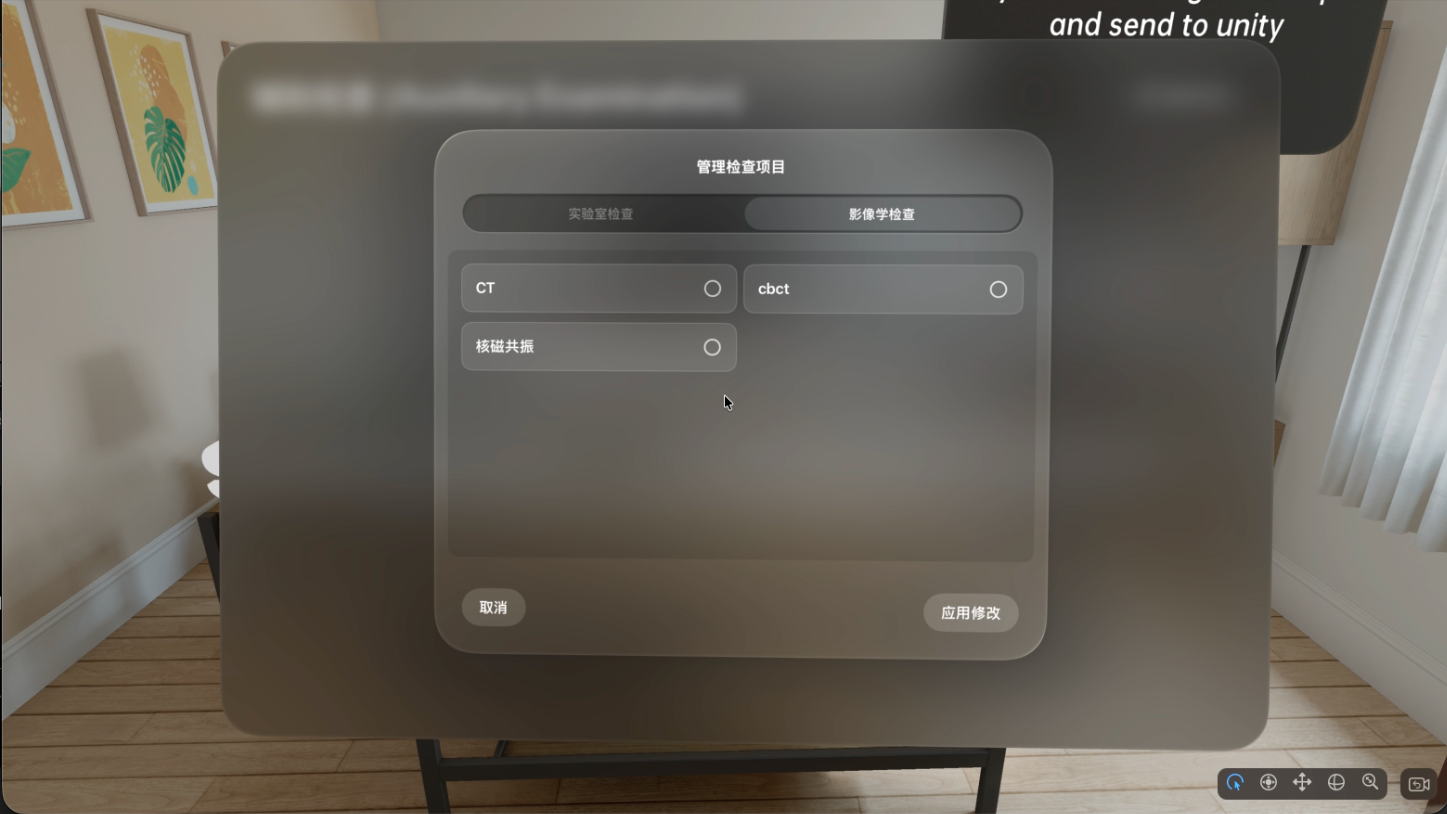
那么首先我们应该先理解unity polyspatial的SwiftUI例子。
#if UNITY_VISIONOS && !UNITY_EDITOR
        [DllImport("__Internal")]
        static extern void SetNativeCallback(CallbackDelegate callback);

        [DllImport("__Internal")]
        static extern void OpenSwiftUIWindow(string name);

        [DllImport("__Internal")]
        static extern void CloseSwiftUIWindow(string name);

        [DllImport("__Internal")]
        static extern void SetCubeCount(int count);

        [DllImport("__Internal")]
        static extern void SetSphereCount(int count);

        [DllImport("__Internal")]
        static extern void SetLastObjectInstanceID(int instanceId);
他们使用dll的方式引入swift代码,并且注册了一个回调,用于接收swift发来的消息。 例如,
  void OnEnable()
        {
            m_Button.WasPressed += WasPressed;
            //注册回调
            SetNativeCallback(CallbackFromNative);
        }

  //接收到消息后的回调函数,可以根据command类型区分后续执行的函数。
 delegate void CallbackDelegate(string command, int value);

        // This attribute is required for methods that are going to be called from native code
        // via a function pointer.
        [MonoPInvokeCallback(typeof(CallbackDelegate))]
        static void CallbackFromNative(string command, int value)
        {
            // MonoPInvokeCallback methods will leak exceptions and cause crashes; always use a try/catch in these methods
            try
            {
                Debug.Log($"Callback from native: {command} {value}");

                // This could be stored in a static field or a singleton.
                // If you need to deal with multiple windows and need to distinguish between them,
                // you could add an ID to this callback and use that to distinguish windows.
                var self = FindFirstObjectByType<SwiftUIDriver>();

                if (command == "closed") {
                    self.m_SwiftUIWindowOpen = false;
                    return;
                }

                if (command == "spawn red")
                {
                    self.Spawn(Color.red);
                }
                else if (command == "spawn green")
                {
                    self.Spawn(Color.green);
                }
                else if (command == "spawn blue")
                {
                    self.Spawn(Color.blue);
                }
                else if (command == "recolor")
                {
                    var thing = PolySpatialObjectUtils.GetGameObjectForPolySpatialIdentifier((ulong)value);
                    thing.GetComponent<MeshRenderer>().material.color = Color.magenta;
                }
            }
            catch (Exception exception)
            {
                Debug.LogException(exception);
            }
        }
其对应的swift代码也可以看到,通过定义一些回调函数可以使用在swift给unity发消息
// Declared in C# as: delegate void CallbackDelegate(string command);
typealias CallbackDelegateType = @convention(c) (UnsafePointer<CChar>, Int32) -> Void
var callbackDelegate: CallbackDelegateType? = nil

// Declared in C# as: static extern void SetNativeCallback(CallbackDelegate callback);
@_cdecl("SetNativeCallback")
func setNativeCallback(_ delegate: CallbackDelegateType)
{
    print("############ SET NATIVE CALLBACK")
    callbackDelegate = delegate
}

// This is a function for your own use from the enclosing Unity-VisionOS app, to call the delegate
// from your own windows/views (HelloWorldContentView uses this)
public func CallCSharpCallback(_ str: String, _ value: Int32 = 0)
{
    if (callbackDelegate == nil) {
        return
    }
    //print("####################send " + str)
    str.withCString {
        callbackDelegate!($0, value)
    }
}
而通过unity给swift发消息也能看到有类似的函数,比如打开窗口的消息
  // Declared in C# as: static extern void OpenSwiftUIWindow(string name);
@_cdecl("OpenSwiftUIWindow")
func openSwiftUIWindow(_ cname: UnsafePointer<CChar>)
{
    let openWindow = EnvironmentValues().openWindow

    let name = String(cString: cname)
    print("############ OPEN WINDOW \(name)")
    openWindow(id: name)
}
在此刻,我们就发现了,其实swiftui与unity的通信非常简单,在swift这段定义一些函数来处理unity传来的消息,在unity这端引入dll并且注册回调来处理swift传来的消息即可。 接下来我们用一个传递json的实战来熟悉。
//定义好我们json所用的函数,模仿官方的即可
typealias StringCallbackDelegateType = @convention(c) (UnsafePointer<CChar>, UnsafePointer<CChar>) -> Void
var stringCallbackDelegate: StringCallbackDelegateType? = nil

@_cdecl("SetNativeStringCallback")
func setNativeStringCallback(_ delegate: StringCallbackDelegateType) {
    print("[SwiftPlugin] 字符串回调通道已建立")
    stringCallbackDelegate = delegate
}

public func CallCSharpCallbackString(_ command: String, _ jsonPayload: String) {
    guard let delegate = stringCallbackDelegate else {
        print("[SwiftPlugin] Error: Unity 回调未注册")
        return
    }
    command.withCString { cCmd in
        jsonPayload.withCString { cMsg in
            delegate(cCmd, cMsg)
        }
    }
}

//这里就是如果unity发给swift消息的话,swift这边需要使用回调模式来处理
// MARK: - jsonString Bridge (回调模式)

// 1. 定义一个闭包类型:(Command, Payload) -> Void
public typealias UnityMessageCallback = (String, String) -> Void

// 2. 定义一个全局变量来保存这个闭包
var onUnityMessageReceived: UnityMessageCallback? = nil

// 3. 提供给 App 端 (AttachmentManager) 调用的注册函数
public func RegisterUnityMessageCallback(_ callback: @escaping UnityMessageCallback) {
    print("[SwiftPlugin] JSON消息回调已注册")
    onUnityMessageReceived = callback
}

// 4. 供 Unity C# 调用的 C 接口
@_cdecl("SendUnityMessageToSwift")
func sendUnityMessageToSwift(_ cmdPtr: UnsafePointer<CChar>, _ msgPtr: UnsafePointer<CChar>) {
    let command = String(cString: cmdPtr)
    let payload = String(cString: msgPtr)

    // 转发给注册的闭包 (通常是 AttachmentManager 提供的)
    DispatchQueue.main.async {
        if let callback = onUnityMessageReceived {
            callback(command, payload)
        } else {
            print("[SwiftPlugin] Warning: 收到 Unity 消息 '\(command)',但在 Swift 端没有接收者 (回调未注册)。")
        }
    }
}
经过以上Swift这一系列操作之后呢,我们只需要考虑unity这边的函数注册,先引入dll,再加入发送和接收消息的处理函数即可,这里可以做一个通用的桥脚本。
        using UnityEngine;
using System.Runtime.InteropServices;
using AOT;
using System;
using System.Collections.Generic;

public class VisionOSBridge : MonoBehaviour
{
    public static VisionOSBridge Instance;

    //定义委托
    public delegate void StringCallbackDelegate(string command, string payload);

    //所有的业务监听者:Dictionary<指令, 回调函数>
    private Dictionary<string, Action<string>> messageListeners = new Dictionary<string, Action<string>>();


    [DllImport("__Internal")]
    private static extern void SetNativeStringCallback(StringCallbackDelegate callback);

    [DllImport("__Internal")] // 通用发送接口
    private static extern void SendUnityMessageToSwift(string command, string payload);

    void Awake() {
        if (Instance == null) Instance = this;
        else Destroy(gameObject);
        DontDestroyOnLoad(gameObject);
    }

    void OnEnable() {
#if UNITY_VISIONOS && !UNITY_EDITOR
        SetNativeStringCallback(OnMessageReceived);
#endif
    }

    /// <summary>
    /// 发送消息(unity->swift)
    /// </summary>
    /// <param name="command"></param>
    /// <param name="jsonPayload"></param>
    public void SendToSwift(string command, string jsonPayload)
    {
#if UNITY_VISIONOS && !UNITY_EDITOR
        SendUnityMessageToSwift(command, jsonPayload);
#else
        Debug.Log($"[Mock Send] Cmd: {command}, Payload: {jsonPayload}");
#endif
    }

    /// <summary>
    /// 接收消息(swift->unity)
    /// </summary>
    /// <param name="command"></param>
    /// <param name="payload"></param>
    [MonoPInvokeCallback(typeof(StringCallbackDelegate))]
    private static void OnMessageReceived(string command, string payload)
    {
        // 切换到主线程分发
        UnityMainThreadDispatcher.Instance().Enqueue(() => {
            if (Instance != null) Instance.DispatchMessage(command, payload);
        });
    }

    private void DispatchMessage(string command, string payload)
    {
        if (messageListeners.ContainsKey(command))
        {
            messageListeners[command]?.Invoke(payload);
        }
        else
        {
            Debug.LogWarning($"[Bridge] 收到未注册指令: {command}");
        }
    }

   /// <summary>
   /// 注册(辅助检查/诊断/治疗)
   /// </summary>
   /// <param name="command"></param>
   /// <param name="callback"></param>
    public void RegisterListener(string command, Action<string> callback)
    {
        if (!messageListeners.ContainsKey(command))
            messageListeners[command] = callback;
        else
            messageListeners[command] += callback;
    }

    public void UnregisterListener(string command, Action<string> callback)
    {
        if (messageListeners.ContainsKey(command))
            messageListeners[command] -= callback;
    }
}

/// <summary>
/// json包装
/// </summary>
public static class JsonHelper
{
    public static T[] GetArray<T>(string json)
    {
        // 包装一下,变成 { "array": [...] } 以便 JsonUtility 解析
        string newJson = "{ \"array\": " + json + "}";
        Wrapper<T> wrapper = JsonUtility.FromJson<Wrapper<T>>(newJson);
        return wrapper.array;
    }

    [Serializable]
    private class Wrapper<T>
    {
        public T[] array;
    }
}
最后呢,就是可以在swift这边使用注册好的函数,处理来自unity的消息。
init() {
        //注册回调
        RegisterUnityMessageCallback { [weak self] command, payload in
                    self?.handleUnityMessage(command: command, payload: payload)
                }
    }
//收到消息后的处理,这里具体的json解析就不列出来了
func handleUnityMessage(command: String, payload: String) {
            print("[Router] 收到指令: \(command)")

            switch command {
            case "Update":
                //处理json
                parseJsonData(json: payload)

            case "LateUpdate":
                print("late")

            default:
                print("[Router] 未知指令,忽略")
            }
        }
写在结尾
这里就已经说明了unity与swift直接的双向通信,如果需要使用unity的坐标位姿来控制swiftui的摆放位置的话,只需要定义一个通信函数,参数里包含位置坐标和可见性即可。这里仅展示swift方面的代码了,因为unity那边就是引入一下同名dll函数即可。
// MARK: - Attachment Bridge (回调模式)

//定义一个回调类型 (ID, x, y, z, isVisible)
public typealias AttachmentUpdateCallback = (String, Float, Float, Float, Bool) -> Void

//定义一个变量来保存这个回调
var onAttachmentUpdate: AttachmentUpdateCallback? = nil

//供 .App文件 调用的注册函数,这是给 AttachmentManager 用的,需要改polyspatial源代码
//AttachmentManager 会调用这个函数,把数据发给我
public func RegisterAttachmentCallback(_ callback: @escaping AttachmentUpdateCallback) {
    print("[SwiftPlugin] AttachmentManager 已注册接收数据")
    onAttachmentUpdate = callback
}

//供 Unity 调用的 C 接口,这是给 C# VisionOSAttachment.cs 用的
@_cdecl("UpdateAttachment")
public func UpdateAttachment(_ idPtr: UnsafePointer<CChar>, _ x: Float, _ y: Float, _ z: Float, _ isVisible: Bool) {
    //这里不直接调用 AttachmentManager,而是调用那个回调
    //这样就不需要依赖 MuseTrackerView 了
    let id = String(cString: idPtr)

    DispatchQueue.main.async {
        // 如果有人注册了回调,就转发数据;没人注册就丢弃
        onAttachmentUpdate?(id, x, y, z, isVisible)
    }
}